EAS Adminstration
eas Problemlösungen
eas Index defekt (File does not exist)
Wenn dieser Fehler auftritt, hilft bisher nur der Neuaufbau des Index
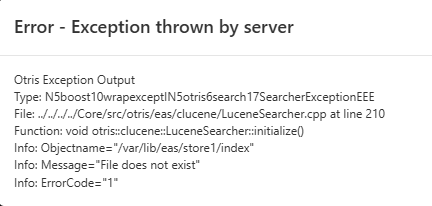
Otris Exception Output
Type:     N5boost10wrapexceptIN5otris6search17SearcherExceptionEEE
File:     ../../../../Core/src/otris/eas/clucene/LuceneSearcher.cpp at line 210
Function: void otris::clucene::LuceneSearcher::initialize()
Info:     Objectname="/var/lib/eas/store1/index"
Info:     Message="File does not exist"
Info:     ErrorCode="1"
Der Neuaufbau kann durch folgenden Befehl gestartet werden:
docker compose exec eas eas -c /etc/eas/store1.ini --rebuild-index -v --force-reset-indexeas cli
eas
Main tool for creating and maintaing a store.
For a more detailed description see Systemdokumentation (German only).
Synopsis
Allowed options:
  -h [ --help ]                    Produce this help message
  -i [ --initialize ]              Initializes an archive
  --crawl                          Crawls the archive folder and rebuilds the
                                   registry
  --incremental                    add entries instead of rebuilding the
                                   registry during crawl
  --start-dir arg                  Crawls all subfolders of the given start
                                   directory
  --no-last-write-time             Do not use last write time as archive date
                                   time
  --rebuild-index                  Rebuilds the search index
  --update-index                   Updates the existing index
  --reindex                        Reindexes search index entries
  --condition arg                  Query to determine the entries to be reindex
  -r [ --restore ]                 Restores the registry and the search index
  --spool-cleanup                  Removed outdated files from the spool
                                   directory
  --temp-cleanup                   Removes archived temp files
  --delete-empty-dirs              Empty directories will be deleted when
                                   cleaning up
  -c [ --config-file ] arg         Use given config-file
  -v [ --verbose ]                 Be verbose
  -d [ --debug ]                   Produces debugging messages
  --log-level arg                  Produces specified log message
  --decrypt arg                    Decrypts the given file
  --encrypt arg                    Encrypts the given file
  --generate-key arg               Generates a key of the given length for
                                   encryption of files
  --output arg                     Path for encryption and decryption output
  --verify-report                  Verifies the whole archive and generate a
                                   report with failed records
  --verify                         Verifies the whole archive
  --threads arg                    Numbers of used threads
  --max-documents arg              Maximum of documents (records and
                                   attachments) to be processed
  --migrate-index                  Clears/fills the index (recommended to call
                                   after changing the indexing mode
  --no-records                     No records will be indexed during index
                                   update
  --no-attachments                 No attachments will be indexed during index
                                   update
  --reset-index                    Resets the search index
  --force-reset-index              Forces a search index reset
  --set-index-status arg           Resets the index status of selected
                                   documents in the store
  --unlock-index                   Removes a remaining write lock on the index
  --version                        Prints the version number(s)
  --with-audit-trail               Minutes activity in the audit trail
  --audit-trail-path arg           Use the given file for writing the audit
                                   trail
  --template-ini arg               Creating the ini from a template
  --template-logging-conf arg      Creating the logging server conf from a
                                   template
  --template-values arg            Path to the file with the values used in the
                                   templates
  --template-value arg             A value used in a template
  --time-period-begin arg          Begin of a period of time specified
                                   according to ISO 8601
  --time-period-end arg            End of a period of time specified according
                                   to ISO 8601
  --logging-conf arg               Path to Loggingserver config file
  --init-counters-cache            Initialize counters cache in the registry
  --update-counters-cache          Updates the counters cache in the registry
  --drop-counters-cache            Remove the counters cache from the registry
  --optimize-index                 Consolidates and optimize the search index
  --max-batch-size arg             Number of objects a thread should index
  --max-merge-segment-size arg     Maximum size of segments that can be merged
  --max-segments arg               Maximum number of segments after
                                   optimization
  --migrate-registry arg           Path to a Sqlite registry to be migrated to
                                   SQL Server
  -x [ --exclusive-index-access ]  index is opened exlusively
  --index-batch-size arg           Size of indexing batches
  --registry-batch-size arg        Size of registry batches
  --only-newest-version            Reindex only the newest version
  --new-update-index               Use the new index mechanism
  --stop-at-time arg               Stops index updating at the given time, if
                                   it is not finished
Example
Create store
# eas -c /path/to/store.ini -i -vFull restore
# eas -c /path/to/store.ini --restore -vSee also Restore
Rebuilding and updating the index
# eas -c /path/to/store.ini --rebuild-index -v
# eas -c /path/to/store.ini --update-index -v
See also Rebuild index
Verify store
# eas -c /path/to/store.ini --verify -vSee also Verification
Optimize index
Reduce the index to one segment file:
# eas -c /path/to/store.ini --optimize-index --max-segment 1 -vSpool cleanup
Delete outdated files in the spool directory
# eas -c /path/to/store.ini --spool-cleanup -vMigrate registry from SQLite to MS SQL Server
# eas -c /path/to/store.ini --migrate-registry -vAdditional log messages
Add --log-level or --debug to get additional message for the various commands. For instance, for the --restore command:
# eas -c /path/to/store.ini --restore --log-level error
# eas -c /path/to/store.ini --restore --log-level warn
# eas -c /path/to/store.ini --restore --log-level info
# eas -c /path/to/store.ini --restore --log-level debug
# eas -c /path/to/store.ini --restore --debug
eas restoring an index
Maintaining the index can be done by using the EAS command line tool eas. For all details eas, see the corresponding manual. In this howto, recommonded settings and maintenance operations are explained.
Rebuilding the index can be invoked as follows:
$ eas -c /path/to/store.ini -v --rebuild-indexAttention: Use these options carefully, as the data in existing indexes will be deleted completely:
--rebuild-index: Resets the whole index and index all records and attachments again.--reset-index: Resets the whole index. Afterwards the index is empty and has to be rebuilt.--force-reset-index: As--reset-index, but allows also to reset corrupted indexes.
Recommended settings
Recommended settings for rebuilding/updating an index. For a complete list see the eas documentation:
--no-attachments: Index the records first. Indexing the records is faster than indexing the attachments. As in the most cases, users search for data in the records, indexing the records first allows to reduce the downtime of the store significantly. Indexing the attachments can be done in a regular maintenance window or outside the business hours.--only-newest-version: The index contains all versions of a record. But in the default, search results only contains the newest version. So, if records have many versions, indexing the newest version first will also reduce the time for rebuilding the index. Indexing the earlier version can be done afterwards in a regular maintenance window or outside the business hours. Not needed, if theindexingMode=newestVersionis used. In this case, older versions will not be indexed by default.--threads: Specifies the number of threads for indexing. The more threads the faster the indexing. But depends on the amount of CPU cores available. Usually, one thread per CPU core will show an increase in the indexing performance. Depending on the environment, more threads will also result in an increased performance, but at some point the disk I/O becomes the bottleneck and adding more threads will show no effect.--exclusive-index-access: Opens the index exclusively. Increases the performance, as no coordination with other processes writing into the index is needed. But needs to stop the archive server.--stop-at-time: Sets the time (as ISO 8601 string) when the reindexing should be stopped. Allows to limit the reindexing to non-business hours.
Bsp. Aufruf zum updaten des Index:
eas -c /etc/eas/store1.ini --update-index
eas restoring the registry
Maintaining the registry can be done by using the EAS command line tool eas. For all details eas, see the corresponding manual. In this howto, recommonded settings and maintenance operations are explained.
Rebuilding the index can be invoked as follows:
$ eas -c /path/to/store.ini -v --crawlAttention: Use these options carefully, as the data in existing data in the registry will be deleted completely:
--crawl: Resets the registry completely and crawls the repository for rebuilding the registry.
Recommended settings
Recommended settings for rebuilding/updating an index. For a complete list see the eas documentation:
--incremental: Allows adding missing records and attachments to the registry. This is usefull, if the registry will be restored in stages. In this case, the existing registry will not be reset.--registry-batch-size: Specifies the number of entries kept in memory before they will be written to the registry. This might increase the performance, as the number of database accesses will be removed. But the hight the batch size is the more it is likely that a interruption of the crawling (e.g. by a HW defect) will cause a complete restore of the registry.--start-dir: Allows to set the crawler at a given start directory instead of the archive folder. This increases the performance when crawling stores of a greater size.
eas verifying a store
To ensure, that the files are not changed, a verification can be executed on a store. The verification checks,
- if all records listed in the registry are available in the repository
- if all signatures of the records match the record and its attachments by
- checking the hash values in the signature
- checking the signature value in the record signature
For technical checks of a stores index and registry, see also the tool eas-check.
Executing the verification
The verification can be executed using the eas. In a case of a successful verification the output looks like this:
# eas -c /path/to/store.ini --verify -v
[  1] Starting verify ...
[  2] Verified 11 / 11 files (100.0 %)
[  3] Finished verify
[  3] Elapsed time 0.6 s
[  4] No invalid signatures detected
In case of a changed record, an exception will be thrown:
# eas -c /path/to/store.ini --verify -v
[  1] Starting verify ...
[  2] Verified 11 / 11 files (100.0 %)
Otris Exception Output
Type:     struct boost::wrapexcept<struct otris::store::SignatureException>
File:     D:\jenkins\workspace\EAS-Develop-Windows-Build-VC16\label\EAS-Windows-
Build-VC16\Core\src\otris\eas\store\Signatory.cpp at line 626
Function: void __cdecl otris::store::Signatory::SignatureXmlHandler::check(void)

IO:       Filename="dso:2020/12/8/14/4315b631-80c4-4b2a-b475-b56d2f4bb90f/4315b631-80c4-4b2a-b475-b56d2f4bb90f.xml"
Info:     Message="Checksum mismatch for a reference!"

Boost Diagnostic Information
D:\jenkins\workspace\EAS-Develop-Windows-Build-VC16\label\EAS-Windows-Build-VC16\Core\src\otris\eas\store\Signatory.cpp(626): Throw in function void __cdecl otris::store::Signatory::SignatureXmlHandler::check(void)
Dynamic exception type: struct boost::wrapexcept<struct otris::store::SignatureException>
std::exception::what: Unknown exception
[struct otris::tag_file_name * __ptr64] = dso:2020/12/8/14/4315b631-80c4-4b2a-b475-b56d2f4bb90f/4315b631-80c4-4b2a-b475-b56d2f4bb90f.xml
[struct otris::tag_message * __ptr64] = Checksum mismatch for a reference!
A report file can be also created. It will be written to the standard outpu as CSV file:
# eas -c /path/to/store.ini --verify-report > verify.csvThe CSV file has the following structure:
- Full path to the signature file
- Error message
- Path to the invalid record in the store
"d:\tmp\worm/store1/ARCHIVE\2020/12/8/14/4315b631-80c4-4b2a-b475-b56d2f4bb90f\4315b631-80c4-4b2a-b475-b56d2f4bb90f.xmldsig";"Checksum mismatch! A refered file was changed!";"dso:2020/12/8/14/4315b631-80c4-4b2a-b475-b56d2f4bb90f/4315b631-80c4-4b2a-b475-b56d2f4bb90f.xml"