# Configuration & Administration
# Permission sets
In order to use the modules, the appropriate authorization set must be assigned to the respective users.
The following are supplied with:
- DXP Core Admin - DEXPRO Core Administrator
- DXP Core User - DEXPRO Core User
- DXP eInvoice Admin - DEXPRO eInvoice Administrator
- DXP eInvoice User - DEXPRO eInvoice User
# DEXPRO Core
The DEXPRO Core manages the individual DEXPRO apps and their documents per client.
All documents that have been entered and processed via the various DEXPRO modules in Microsoft Dynamics 365 Business Central are displayed. A global number series, which is used across all DEXPRO apps, is used to complete individual documents. This offers the advantage that users only have to work with one number series per document.
Further information can be found [here](https://docs.squeeze.one/books/dexpro-microsoft-dynamics-365-business-central-apps/chapter/dexpro-core).
# eInvoice Sender Setup
In the eInvoice Sender setup, both the connection to the DIGIvoice system and the processing within the app are set up.
### Menue
#### Download Configuration
This is used to download the configuration and structure of the e-invoice documents.
### Related
#### Document Queue
You can access the document queue via this menu item.
#### Process Log
You can access the process log of transactions with Digivoice via this menu item.
#### Customer Setup
You can access the [customer-specific setup](https://docs.squeeze.one/books/einvoice-sender-for-microsoft-dynamics-365-bc-en-us/page/customer-and-vendor-setup) via this menu item.
#### Vendor Setup
You can access the [vendor-specific setup](https://docs.squeeze.one/books/einvoice-sender-for-microsoft-dynamics-365-bc-en-us/page/customer-and-vendor-setup) via this menu item.
#### OAuth 2.0 Setup
This menu item takes you to the [OAuth 2.0 setup](https://docs.squeeze.one/books/einvoice-sender-for-microsoft-dynamics-365-bc-en-us/page/oauth-20-setup) for authentication on the Digivoice system.
#### Mappings
- Payment Term Keywords
- Unit of Measure Codes
- XR Field Structure
### General
In this FastTab, you can activate/deactivate the use of this app and set up the connection to the Digivoice system.
[](https://docs.squeeze.one/uploads/images/gallery/2025-06/image-1749194930883.png)
### Export-Einstellungen
The standards for the export are saved here.
[](https://docs.squeeze.one/uploads/images/gallery/2025-06/image-1749194946937.png)
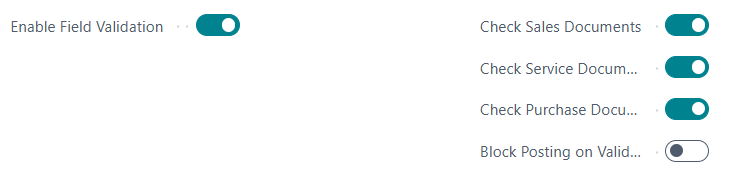
### eInvoice Konformitätsprüfung
Here you will find the settings for the compliance check.
[](https://docs.squeeze.one/uploads/images/gallery/2025-06/image-1749194964361.png)
### Belegwarteschlange
Here you can specify how long the entries are to be kept.
[](https://docs.squeeze.one/uploads/images/gallery/2025-06/image-1749194979666.png)
# Customer and Vendor Setup
### Customer-Specific Settings
Access via **DEXPRO eInvoice Setup** → **Customer Setup**
**Configuration Options:**
- **Override Email**: Use different email than default
- **Automatic Processing**: Enable/disable automatic document sending
- **Sending Profile**: Default format for this customer
- **Buyer Reference**: Customer-specific reference requirements
### Vendor-Specific Settings
Similar configuration available for vendors for purchase credit memos.
### Email Templates
The system uses Word-based email templates:
**Available Templates:**
- **[SalesInvoiceEmail.docx](vscode-file://vscode-app/c:/Users/BerndFeddersen/AppData/Local/Programs/Microsoft%20VS%20Code/resources/app/out/vs/code/electron-sandbox/workbench/workbench.html)**: Sales invoice emails
- **[SalesCreditMemoEmail.docx](vscode-file://vscode-app/c:/Users/BerndFeddersen/AppData/Local/Programs/Microsoft%20VS%20Code/resources/app/out/vs/code/electron-sandbox/workbench/workbench.html)**: Sales credit memo emails
- **[ServiceInvoiceEmail.docx](vscode-file://vscode-app/c:/Users/BerndFeddersen/AppData/Local/Programs/Microsoft%20VS%20Code/resources/app/out/vs/code/electron-sandbox/workbench/workbench.html)**: Service invoice emails
- **[PurchaseCreditMemoEmail.docx](vscode-file://vscode-app/c:/Users/BerndFeddersen/AppData/Local/Programs/Microsoft%20VS%20Code/resources/app/out/vs/code/electron-sandbox/workbench/workbench.html)**: Purchase credit memo emails
**Template Features:**
- Professional formatting
- Dynamic content insertion
- Company branding
- Multi-language support
# OAuth 2.0 Setup
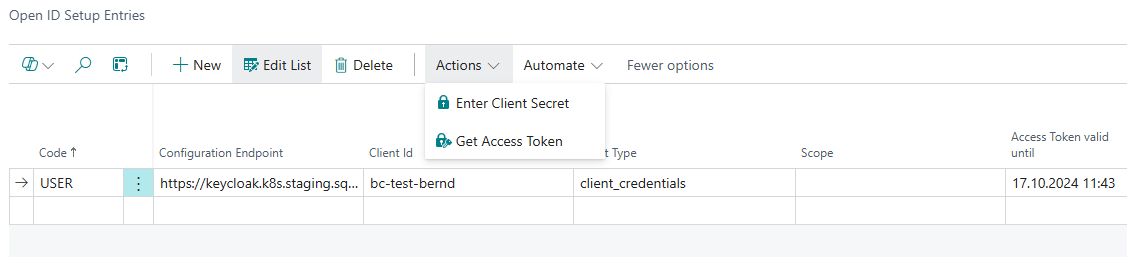
The OAuth 2.0 / Open Id users and their access tokens are managed here.
[](https://docs.squeeze.one/uploads/images/gallery/2024-10/image-1729158448988.png)