# eInvoice Sender Setup
In the eInvoice Sender setup, both the connection to the DIGIvoice system and the processing within the app are set up.
### Menue
#### Download Configuration
This is used to download the configuration and structure of the e-invoice documents.
### Related
#### Document Queue
You can access the document queue via this menu item.
#### Process Log
You can access the process log of transactions with Digivoice via this menu item.
#### Customer Setup
You can access the [customer-specific setup](https://docs.squeeze.one/books/einvoice-sender-for-microsoft-dynamics-365-bc-en-us/page/customer-and-vendor-setup) via this menu item.
#### Vendor Setup
You can access the [vendor-specific setup](https://docs.squeeze.one/books/einvoice-sender-for-microsoft-dynamics-365-bc-en-us/page/customer-and-vendor-setup) via this menu item.
#### OAuth 2.0 Setup
This menu item takes you to the [OAuth 2.0 setup](https://docs.squeeze.one/books/einvoice-sender-for-microsoft-dynamics-365-bc-en-us/page/oauth-20-setup) for authentication on the Digivoice system.
#### Mappings
- Payment Term Keywords
- Unit of Measure Codes
- XR Field Structure
### General
In this FastTab, you can activate/deactivate the use of this app and set up the connection to the Digivoice system.
[](https://docs.squeeze.one/uploads/images/gallery/2025-06/image-1749194930883.png)
### Export Settings
The standards for the export are saved here.
[](https://docs.squeeze.one/uploads/images/gallery/2025-06/image-1749194946937.png)
#### XRechnung 3.0 defaults
The export defaults ship pre-configured for the current XRechnung 3.0 standard. The **Business Process Type** and **Specification Identifier** are the two profile fields that identify the e-invoice standard against which each document is generated:
- **Business Process Type** - default **urn:fdc:peppol.eu:2017:poacc:billing:01:1.0**.
- **Specification Identifier** - default **urn:cen.eu:en16931:2017#compliant#urn:xeinkauf.de:kosit:xrechnung\_3.0** (the XRechnung 3.0 CIUS identifier).
These defaults ensure generated documents declare conformance to XRechnung 3.0. Only change them if you are targeting a different profile and you understand the downstream validation impact.
### eInvoice Compliance Check
Here you will find the settings for the compliance check.
[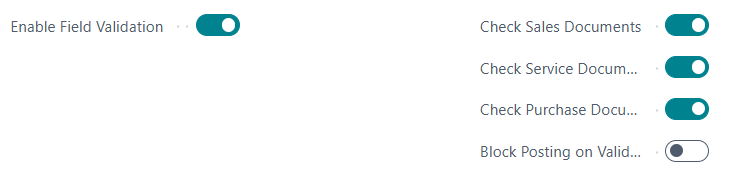](https://docs.squeeze.one/uploads/images/gallery/2025-06/image-1749194964361.png)
### Document Queue
Here you can specify how long the entries are to be kept.
[](https://docs.squeeze.one/uploads/images/gallery/2025-06/image-1749194979666.png)
### Expert Settings
The **Show Expert Settings** toggle hides advanced, low-level configuration by default. It is a UI-only switch (it is not stored in the setup). When you enable it, the following additional groups become visible on the setup page:
- **XRechnung** - profile identifiers and XRechnung-specific export defaults (see XRechnung 3.0 defaults above).
- **XML Validation** - settings controlling schema/schematron validation of the generated XML.
- **Validation Patterns** - the regular-expression patterns used by the compliance rules.
- **Object Schemas** - the schema definitions describing the document object structure.
Leave Expert Settings switched off during normal operation. These groups define how documents are built and validated - incorrect changes can cause generation or validation to fail.
The behaviour of individual compliance rules (enable/disable, severity override, category and stage) is configured separately - see the [Rule Setup](https://docs.squeeze.one/books/einvoice-sender-for-microsoft-dynamics-365-bc-en-us/page/rule-setup) page.