
Document Management
Document Queue
Access via DEXPRO eInvoice Setup → Document Queue

Columns Displayed:
- Entry No.: Unique identifier
- Document Type: Type of document (Invoice, Credit Memo, etc.)
- Document No.: Business Central document number
- Customer/Vendor No.: Trading partner
- Status: Current processing status
- Created Date Time: When queued
- Sending Profile: Format to be generated
Actions Available:
- Process Selected: Manually trigger processing of the selected entries. Each entry is processed on its own, so an error in one entry does not undo the others. At the end a message shows how many entries were processed and how many of them without success; the status of an entry shows what went wrong.
- Re-queue: Put the selected entries in status Error or Failed back to Pending with a fresh retry count, so that the next Job Queue run processes them again - for example after you corrected the data a KoSIT rejection pointed at. Entries in any other status are skipped.
- Delete: Remove from queue
Process Log
Monitor all system activities via DEXPRO eInvoice Setup → Process Log
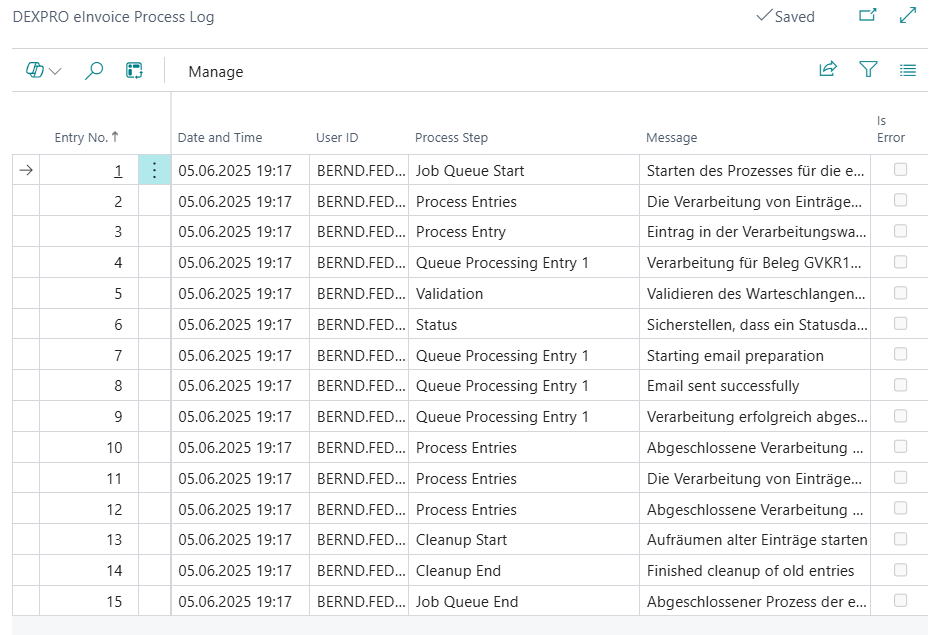
Information Tracked:
- Processing timestamps
- Success/failure status
- Error messages
- Document details