
Document Classes Setup
In the SQUEEZE document class facility, the mapping between the respective
document class and your export interface. Furthermore, the field mapping of each document class is downloaded here, creating a set of standard fields and their usage in Microsoft Dynamics 365 Business Central.
Process

Download field mapping
This downloads the field structure of the SQUEEZE document class. These are needed for the metadata mapping.
Navigation

Metadata mapping
List
Document classes
This overview lists all the document classes that have been set up.

Card
Document class
Here, each document class is set up individually.
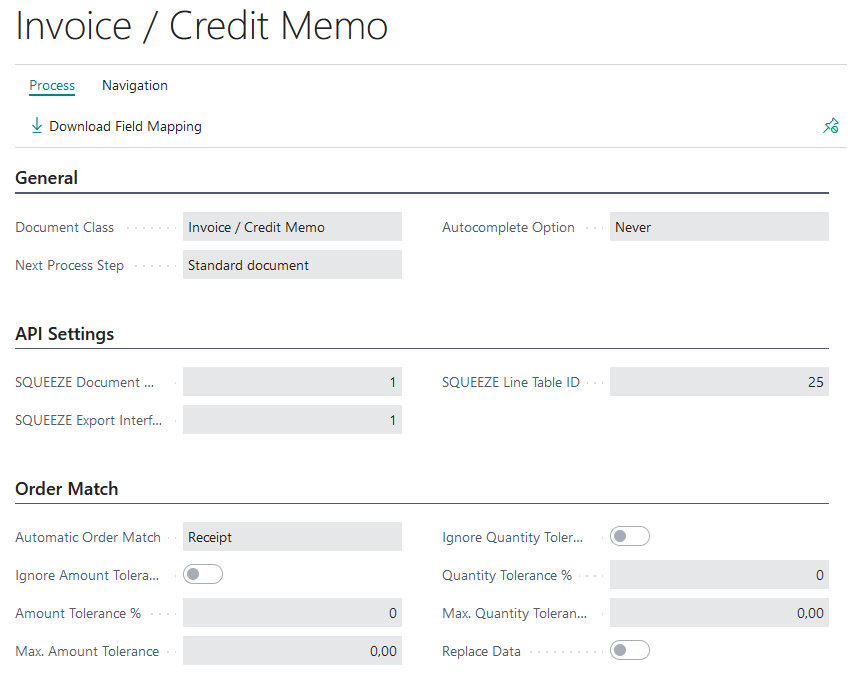
General
In this fastab the automatic enrichment of the positions is set up.
API Settings
In this fastab the SQUEEZE specific tables and export interfaces are set up.
Order Match
The purchase order reconciliation is used for the automated check of the read out positions with those of the still open purchase orders in Microsoft Dynamics 365 Business Central. In this Fasttab, the permissible amount & quantity tolerances for the matching are set up. Additionally, it can be defined whether the matching should take place on purchase orders or deliveries. If "Replace data" is active, the amounts and descriptions of the items will be replaced with those of the order/delivery after matching.