
Processing of Attachments
This documentation describes how attachments are handled during mail imports. The documented behavior is independent of the mail protocol used — it makes no difference whether mails are imported via IMAP, EWS, etc.
This page describes how attachments of an already-imported email are classified and processed. Whether an email is imported at all is controlled independently by sender/subject filters, see Filtering via Black- and Whitelisting.
Attachments with Passwords
In daily business, a large number of encrypted attachments can arrive via your company's digital inbound channels. The following section covers the options available in Squeeze.
Compressed archives (.zip)
If you receive encrypted ZIP archives from your senders, Squeeze offers a way (from version >=2.4.1) to store passwords per unique email address.
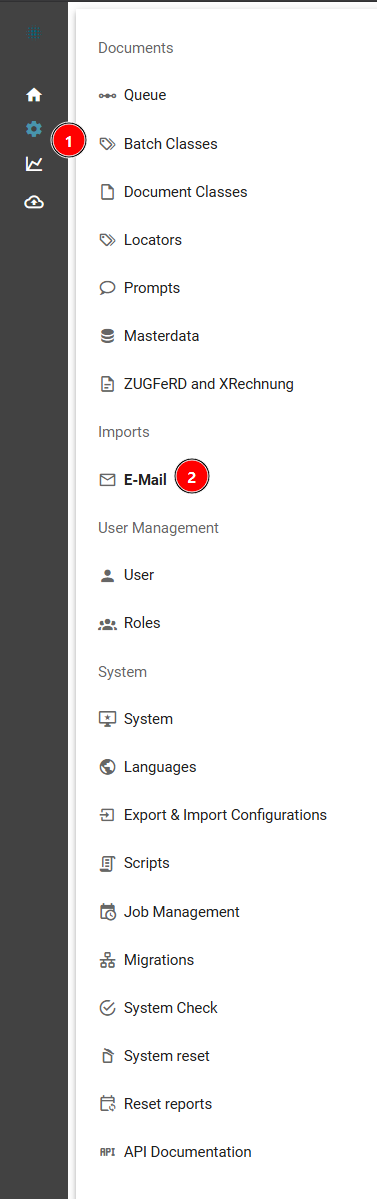
To configure this, open the Email tab as an admin:
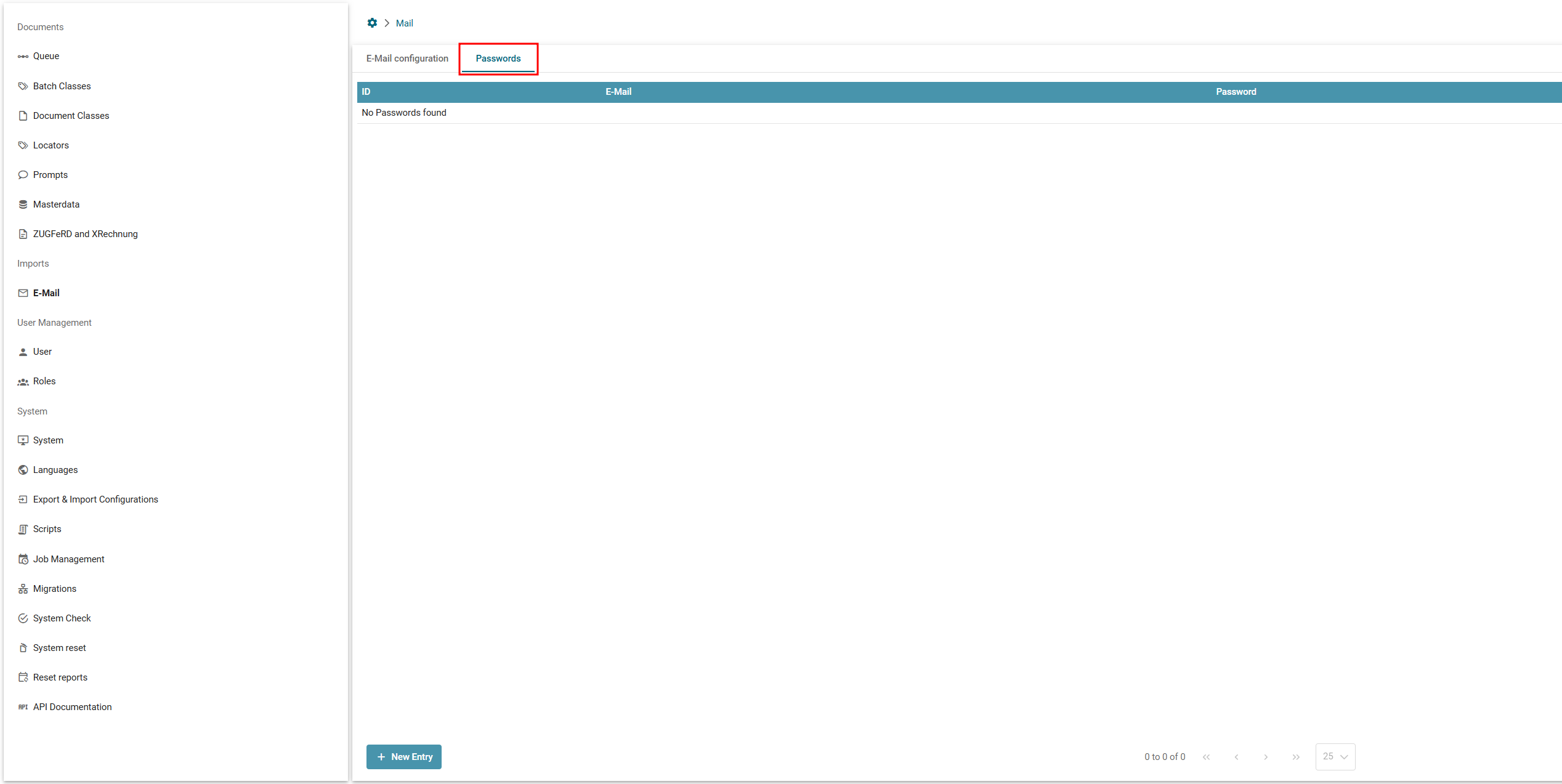
Afterwards switch to the Passwords sub-tab within the email configuration screen:

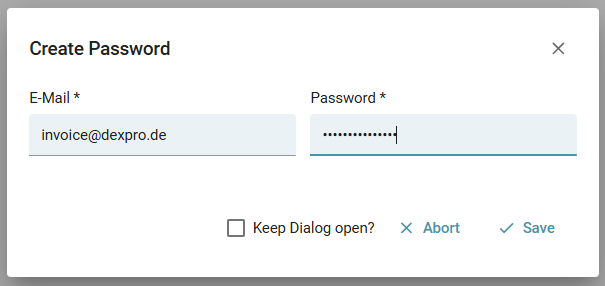
Save the data by entering a unique email address and a password.
Please note the following when using this functionality:
- You must specify full email addresses — always the complete address, otherwise saving fails.
- To assign multiple passwords to one email address, simply create multiple entries.
- If emails contain attachments that cannot be decrypted, those emails are moved to the configured error email folder.
Stored passwords are not used for password-protected PDF files.
A unique email address looks like: dexpro@test.com, not wildcard constructs like: *pro@test.com
Attachment Filters (Email Attachment Filters)
How it works
For each mail, attachments are checked against import rules. The first rule whose sender and filename pattern match an attachment decides what happens to it. Non-global rules take highest priority.
Example:
| Priority | Example |
|---|---|
| First priority | specific sender (support@dexpro.de) + specific filename pattern (Rechnung.pdf) |
| Second priority | specific domain (dexpro.de) + unspecific filename pattern (*.pdf) |
| etc. | - |
If no rule matches, the attachment is ignored.
Squeeze uses the "PDFBox" software library to perform PDF merging or splitting. This library's availability is essential for attachment filtering. From Squeeze version 2.3.4, this library is included in the System Checks, allowing quick identification of possible error causes.
In more detail: rules for the Document and Attachment type are resolved independently of each other: for each type, an exact sender match is looked up first, then domain, then (automatically for document rules; for attachment rules only if the global rule is still reached afterwards) the global rule (*). Among the resulting candidate rules, the final tiebreak is that the longest filename pattern wins — the table above simplifies this for the common case.
The filename pattern (filenamepattern) is evaluated as a shell wildcard pattern (*, ?, [abc]). If the filename match fails, the MIME type is additionally checked as a fallback, provided the pattern is *.pdf or *.xml.
The emailattachmentfilters master data table is used to tell SQUEEZE whether and how attachments are relevant for recognition.
The table has the following structure:
| Name | Description | Meaning |
|---|---|---|
| id | ID | Unique technical ID |
| batchclassid | Batch Class ID | ID of the batch class for which the rule is defined |
| sender | Sender | Sender of the email (wildcards allowed, see note below) |
| filenamepattern | Filename Pattern | Filename filter (wildcards allowed) |
| type | Type | Relevant Document for extraction or accompanying Attachment |
| singledocument | Single Document | Flag indicating whether the file should become a standalone document (X) |
| newbatchclassid | New Batch Class ID | If the document should be moved to a different batch class, the batch class ID of the new batch class goes here |
| newdocumentclassid | New Document Class ID | If a new document class should also be set, the document class ID goes here |
Example configurations
Example
| ID | Batch Class | Sender | Pattern | Type | Single Document | new Batch Class | new Document Class |
|---|---|---|---|---|---|---|---|
| 1 | 1 | * | D | ||||
| 2 | 1 | * | AGB.pdf | A | |||
| 3 | 1 | dexpro.de | INV*.pdf | D | X | ||
| 4 | 1 | payment@dexpro.de | Avis*.pdf | D | X | 2 | 2 |
| 5 | 1 | dexpro.de | *.xml | A | |||
| 6 | 1 | invoice@squeeze.one | *.xml | D | |||
| 7 | 1 | invoice@squeeze.one | A |
Explanation of the rules
Rule ID 1: For every sender, every PDF of an email is treated as a document for extraction, and all PDFs are merged into one document.
Rule ID 2: For every sender, the PDF named AGB.pdf is kept as an attachment.
Rule ID 3: Only applies to senders on the dexpro.de domain; PDFs matching the filename pattern INV*.pdf are kept as a Document. Additionally, every file matching this pattern becomes its own standalone document.
Rule ID 4: Only applies to sender payment@dexpro.de; PDFs matching the filename pattern Avis*.pdf are kept as a Document. Additionally, every matching file becomes a standalone document of a new batch and document class.
Rule ID 5: Only applies to senders on the dexpro.de domain; XML files (e.g. an XRechnung) are kept as Attachments. This assumes a valid PDF exists in the email (e.g. from Rule ID 3) that forms the main document.
Rule ID 6 & 7: Only apply to sender invoice@squeeze.one; XML files (e.g. an XRechnung) are kept as a Document. Any additionally attached PDF documents are kept as Attachments.
Note on the Sender field
The Sender field does not allow wildcards combined with text.
Allowed values:
- *
- domain.de
- foobaa@domain.de
Not allowed are wildcard/string combinations:
- *domain*
- *domain.de
Rules can be defined to control the processing of emails containing both XRechnung documents and ZUGFeRD invoices.
Processing multiple PDF invoices (incl. ZUGFeRD) in one email individually
Symptom
A sender sends several invoices as separate PDF attachments in a single email — for example several ZUGFeRD/hybrid invoices (PDF with embedded XML) in one bulk mail. Without matching configuration, these PDFs get merged into one document (PDF merge), or extraction ends up using the embedded XML of the "wrong" PDF.
Cause
If the same Document rule matches several attachments of one email and that rule's singledocument column is empty, all matching attachments are merged into one shared document. This applies regardless of whether the attachments are plain PDFs or ZUGFeRD/hybrid PDFs with embedded XML.
Fix: singledocument = X
If the matching rule has singledocument set to X, a separate document is created for each matching attachment — invoices are extracted individually instead of being merged.
Example:
| ID | Batch Class | Sender | Pattern | Type | Single Document | new Batch Class | new Document Class |
|---|---|---|---|---|---|---|---|
| 8 | 1 | invoices@customer.de | D | X |
With this rule, every PDF file from an email sent by invoices@customer.de is treated as its own standalone document — no matter how many PDFs (including ZUGFeRD hybrids) are contained in the same email.
`newbatchclassid` / `newdocumentclassid` can additionally reroute each individually created document to a different batch or document class — e.g. when invoices and credit notes arrive together but need different processing.
Interaction with ZUGFeRD Strict Mode
If ZUGFeRD Strict Mode is active (default-on since version 2.33, see disabling it here), matching PDF document rules are overridden at runtime in favor of XML processing (see the update notes below). The singledocument value carries over, however — so a rule with singledocument = X still processes each invoice individually even while Strict Mode is active.
Further background on XRechnung/ZUGFeRD processing: Digital Formats (XML, XRechnung, ZUGFeRD).
Troubleshooting
If invoices from a sender still get merged despite singledocument = X, check:
- Whether a different, longer-matching rule (e.g. a global
*.pdfrule withoutsingledocument) is matching first — see "How it works" above on filename-pattern length priority. - Whether the rule is actually registered for the correct sender or domain (sender before domain before global).
- The comparable troubleshooting example for a similar case.
Update Notes
Separation of attachments and document from Squeeze 1.10
In Squeeze 1.9 (and older), documents and attachments were handled differently on import, but were treated as one file in subsequent processing steps. The result was that the primary document to be processed and the attachments were merged into a single PDF and then extracted as if a single file had been imported.
From Squeeze 1.10, attachments are handled separately and are therefore not part of the document being extracted. This can also affect export interfaces that can only export one file per document (e.g. NavisionSoap) — these now only export the main document in the newer version; attachments are not exported.
If the pre-1.10 behavior should be retained, mark all attachments as documents in the attachment filters.
Prioritization of XML invoices over PDF files from Squeeze 2.17
With the introduction of version 2.17, Squeeze's default behavior was adjusted so that invoices in XML format are preferred over PDF files. The background for this change is that customers and partners increasingly pointed out that invoice issuers often send documents in both XML and PDF format. Depending on configuration, this could lead to duplicates or processing errors.
To ensure consistent handling of documents by default, version 2.17 establishes that documents in XML format are given priority. This behavior can, however, be adapted to individual requirements via the rules described above. General prioritization of PDF files is currently not planned.
ZUGFeRD Strict Mode — Prioritizing XML for hybrid e-invoice formats
With the introduction of version 2.30 (April 2026), ZUGFeRD Strict Mode was introduced as a batch class property. When active, attachment filters are overridden in favor of XML processing. So for a ZUGFeRD process, existing filters that prefer PDFs are overridden. This behavior is logged to ensure traceable processing.
There is additionally a system check that can detect a possible misconfiguration.
Further information on Strict Mode can be found here.
No comments to display
No comments to display