
Document Classes Setup
In the SQUEEZE document class facility, the mapping between the respective
document class and your export interface. Furthermore, the field mapping of each document class is downloaded here, creating a set of standard fields and their usage in Microsoft Dynamics 365 Business Central.
Process

Download field mapping
This downloads the field structure of the SQUEEZE document class. These are needed for the metadata mapping.
Navigation

Metadata mapping
List
Document classes
This overview lists all the document classes that have been set up.

Card
Document class
Here, each document class is set up individually.
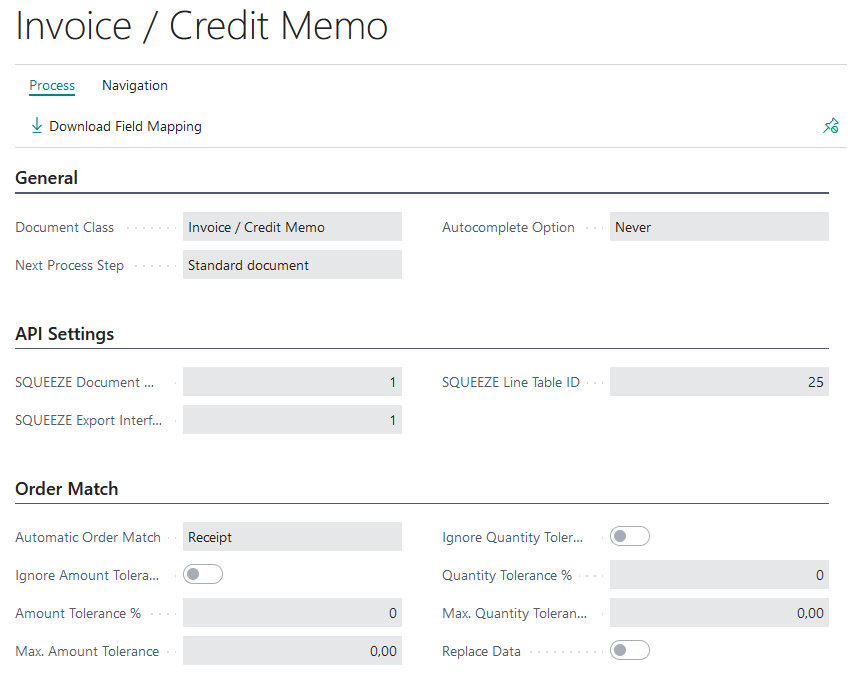
General
In this fastab the name of the document class, the next process step, as well as the automatic enrichment of the positions is set up.
Squeeze
Autocomplete:
In the case of documents without a purchase order reference, the system can remember and recall the items read in and the account assignment applied to them for each vendor. There are three options that can be selected for this.
- Never: Disables the function and hides the button in the validation page
- Manual: Applying the autocomplete data is done manually by clicking the button "Autocomplete". Die Speicherung der Metadaten für die Autovervollständigung wird automatisch beim Abschluss des Validierungsprozesses ausgeführt

- Automatic: Creating and applying the data for auto-completion is done automatically
- When creating the SQUEEZE document, the entries are applied
- When the validation is completed, the entries are created/updated

Automatic validation:
Enable this option to have Squeeze for BC automatically validate incoming receipts. Please note that this function works only in case of perfectly plausible data.
Account assignment code:
Specifies the account assignment setup to be used when performing the account assignment in the validation process.
API Settings
In this fastab the SQUEEZE specific tables and export interfaces are set up.
Order Match
The purchase order reconciliation is used for the automated check of the read out positions with those of the still open purchase orders in Microsoft Dynamics 365 Business Central. In this Fasttab, the permissible amount & quantity tolerances for the matching are set up. Additionally, it can be defined whether the matching should take place on purchase orders or deliveries. If "Replace data" is active, the amounts and descriptions of the items will be replaced with those of the order/delivery after matching.