
Vendor Related Setup
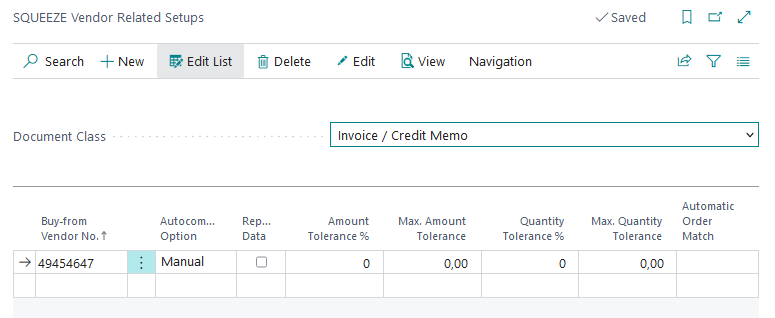
In this setup, vendor-specific settings are made per SQUEEZE document class. This is done for vendors that deviate from the set client standard.
In addition to the auto-completion of positions, deviating amount and quantity tolerances can also be set up here.
List
Card
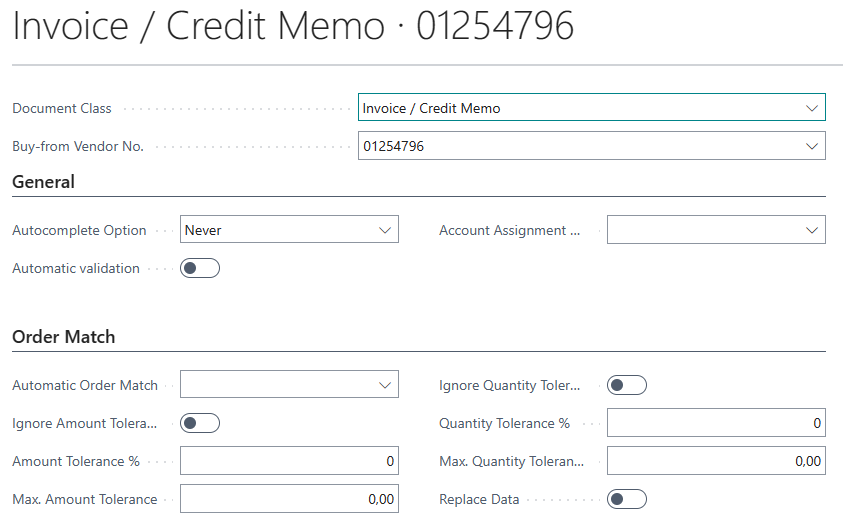
Autocomplete:
In the case of documents without a purchase order reference, theThe system can remember andper recallvendor how you assigned the itemslines readof a document (type, no., unit of measure, description and dimensions) and fill in andthe same lines on the accountnext assignment applied to them for each vendor.documents. There are three options that can be selected for this.
- Never:
DisablesThethefeaturefunctionisandswitchedhidesofftheforbuttonthisinvendor. The "Autocomplete" action is hidden on the validation page and nothing is filled in on import. - Manual:
ApplyingThe lines are remembered on validation. They are only applied when you run theautocomplete"Autocomplete"dataactionis done manually by clickingon thebuttonvalidation"Autocomplete". Die Speicherung der Metadaten für die Autovervollständigung wird automatisch beim Abschluss des Validierungsprozesses ausgeführtpage.
- Automatic:
CreatingThe lines are remembered on validation andapplyingapplied automatically when a document without an order no. is imported – provided thedatadocument class is set to "Automatic" as well.

To see the entries arelearned applied
Automatic validation:
Enable this option to have Squeeze for BC automatically validate incoming receipts. Please note that this function works only in case of perfectly plausible data.
Account assignment code:
Specifies the account assignment setup to be used when performing the account assignment in the validation process.
Order Match
The order reconciliation is used for the automated check of the read out positions with those of the still open orders in Microsoft Dynamics 365 Business Central. In this FastTab, the permissible amount & quantity tolerances for the matching are set up. Additionally, it can be defined whether the matching should take place against purchase orders or deliveries. If "Replace data" is active, the amounts and descriptions of the items will be replaced with those of the purchase order/delivery after matching.