
Vendor Related Setup
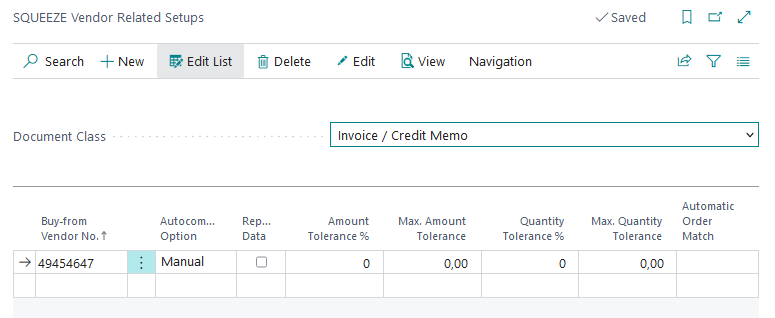
In this setup, vendor-specific settings are made per SQUEEZE document class. This is done for vendors that deviate from the set client standard.
In addition to the auto-completion of positions, deviating amount and quantity tolerances can also be set up here.
List
Card
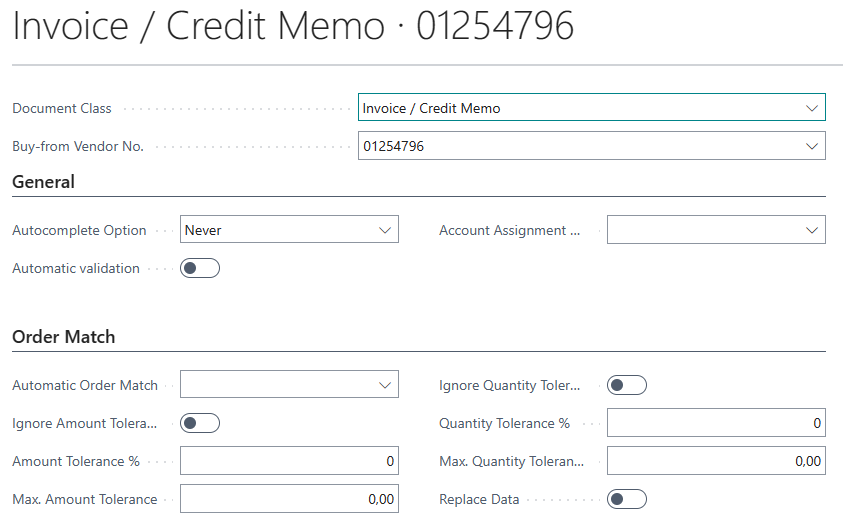
Autocomplete:
The system can remember per vendor how you assigned the lines of a document (type, no., unit of measure, description and dimensions) and fill in the same lines on the next documents. There are three options that can be selected for this.
- Never: The feature is switched off for this vendor. The "Autocomplete" action is hidden on the validation page and nothing is filled in on import.
- Manual: The lines are remembered on validation. They are only applied when you run the "Autocomplete" action on the validation page.

- Automatic: The lines are remembered on validation and applied automatically when a document without an order no. is imported, even if the document class is set to "Manual".

If a vendor has a Vendor Related Setup, its option applies instead of the document class option – in both directions. A new Vendor Related Setup starts with the option of the document class. Prerequisites, how it works and examples: see Autocomplete.
To see the entries learned for a vendor, use the Autocomplete Entries action in the list.
Automatic validation:
Enable this option to have Squeeze for BC automatically validate incoming receipts. Please note that this function works only in case of perfectly plausible data.
Account assignment code:
Specifies the account assignment setup to be used when performing the account assignment in the validation process.
Order Match
The order reconciliation is used for the automated check of the read out positions with those of the still open orders in Microsoft Dynamics 365 Business Central. In this FastTab, the permissible amount & quantity tolerances for the matching are set up. Additionally, it can be defined whether the matching should take place against purchase orders or deliveries. If "Replace data" is active, the unit price and line amount of the order line replace those of the line (for a receipt also the unit price and product posting groups of the receipt line); otherwise the unit price is only taken over if it is 0. Invoices and credit memos always take over the description, quantity and line discount % of the order line.
No comments to display
No comments to display