
Configure related tables (optional)
Why do I need related tables?
The rule engine can check conditions not only on the primary table, but also on related tables (e.g. header/lines).
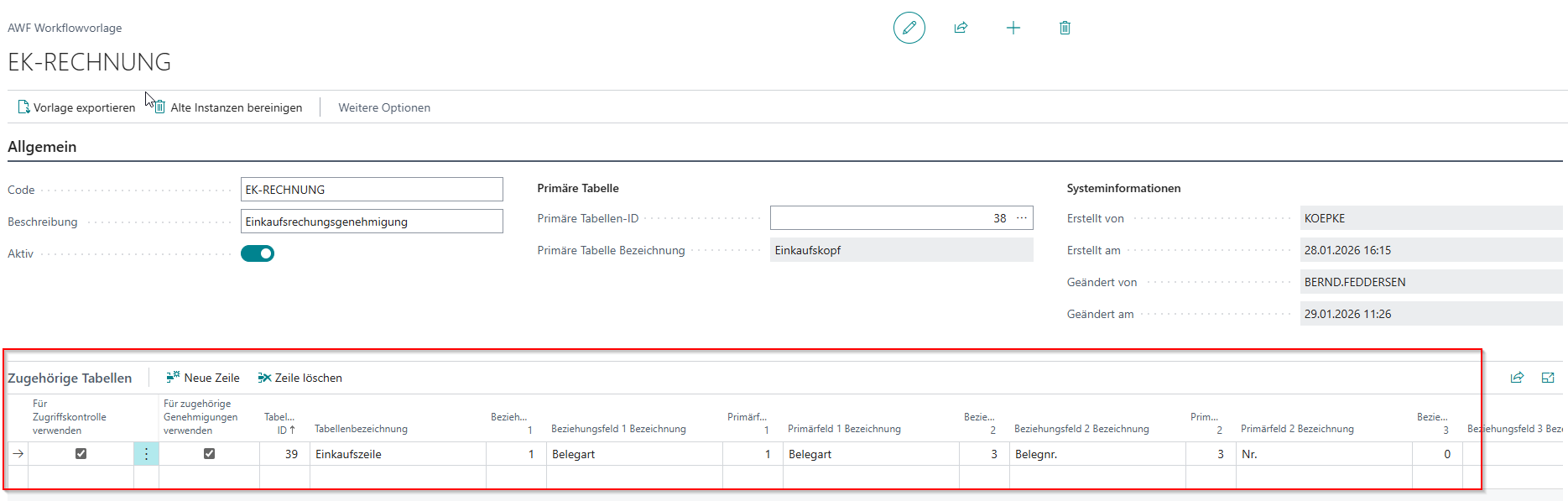
You define these related tables in the template in the area:
- Related Tables (technically: "DXP Rule Set Tables")
Add a related table
- In the template, in the section, Related Tables create a new line.
- Table ID select (lookup).
- Define the relation to the primary table:
-
Relation Field 1 (field number in the related table)
- Primary Field 1 (field number in the primary table)
-
Optionally also Relation Field 2 / Primary Field 2 etc.
-
Rule of thumb:
-
Relation field(s) = "foreign key" in the related table
-
Primary field(s) = the matching key/reference fields in the primary table
Important: Without a correctly defined relation, the rule engine cannot cleanly evaluate fields of the related table against the current record.
No comments to display
No comments to display